
The Final Step of Retouching Nobody Talks About — The Frame
Take headshots out of the picture.
When decorating a home with artwork, it’s easy to spend as much time choosing the right frame and mounting option as it does selecting the piece itself.
Both decisions will change the presentation, and both decisions depend on context and taste. What is the vibe of the room, how is the lighting, what color and texture are the walls?
Now put headshots in the picture, the framing is just as impactful, and done poorly can really undermine the point of paying for professional headshots.
Only with headshots, framing isn’t a literal frame. Cue: the crop.

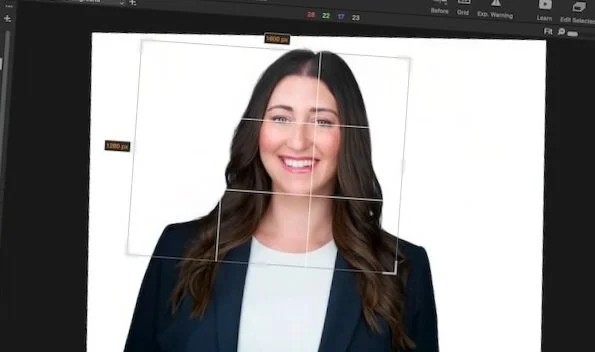
The cropping of a portrait is the cherry on top, and a quick look at the GIF above should demonstrate how much the final result changes as we choose to include more torso, or none at all. In general, our goal for headshots is to crop until it hurts, which is how we land on our favorite crop, the 4x5 - detailed below. But cropping is a delicate balance of shape and white space that so many people, photographers and subjects, take for granted.
We’ve all seen the colleague who took “headshot” a little too literally, cropping just their head in frame.
(I don’t know about you but those crops immediately conjure up Season 1 Episode 1 of Game of Thrones, or El Tortuga from Breaking Bad —graphic warning if you decide to google that one).
And while it may feel like a stretch, those who operate in branding, marketing, and advertising know very well how these subtle changes live at the core of creative work. The takeaway is even if we don’t all think “wow, that feels like someone whose head was chopped off”, it can register subconsciously. Or more conservatively, it just feels sloppy.

The first step in our retouching is exposure balancing and color enhancement Second is the detailed polishing in photoshop — blemishes, skin smoothening, flyaways, etc. After that, it is time to create the crops!
5x7 Wide crops offer flexibility. Leaving space above and on the side of the shoulders allows marketing, graphic designers, web designers, etc., to crop and/or expand the image as needed within any layout.
4x5 Zoom crops are about impact. Intentionally cropping in at one shoulder, and just barely cropping the top of the head will pull the viewer into the subject’s features. By taking in the eyes, mouth, eyebrows, etc., the story being told by the image “we deliver”…" “we are friendly”, etc., can’t be missed.
Circle crops are created for compatibility. Taking the original rectangular shape of the headshot and fitting it into a circle really changes up the balance. We tilt, zoom, and use photoshop making a new image entirely with subtly reshaped hair/jacket silhouettes to balance the white space. It’s safe to say circle crop is our least favorite, but we can’t ignore the social media profiles!
Square crops, similarly to circle crops, are often used on websites, when multiple faces are presented in a grid. If possible, we suggest trying the 4x5 zoom where many tend to default to squares. Try it and let us know?
These four crop formats come standard with full headshot retouching. If you require a unique ratio or vertical crops, just let us know!

